Passwordless Authorization
This guide explains how to enable player authorization through your Game App, allowing seamless access to the Game Hub without requiring players to manually enter their user ID.
Prerequisites
- An active Server-to-Server (S2S) API key for request authentication.
Step 1: Intercept the Authorization Deep Link in the Game Client
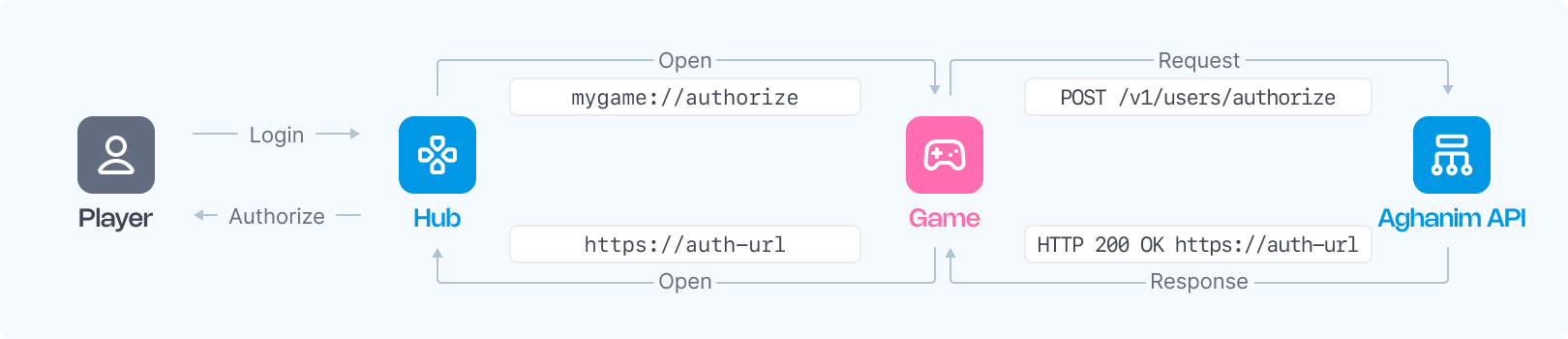
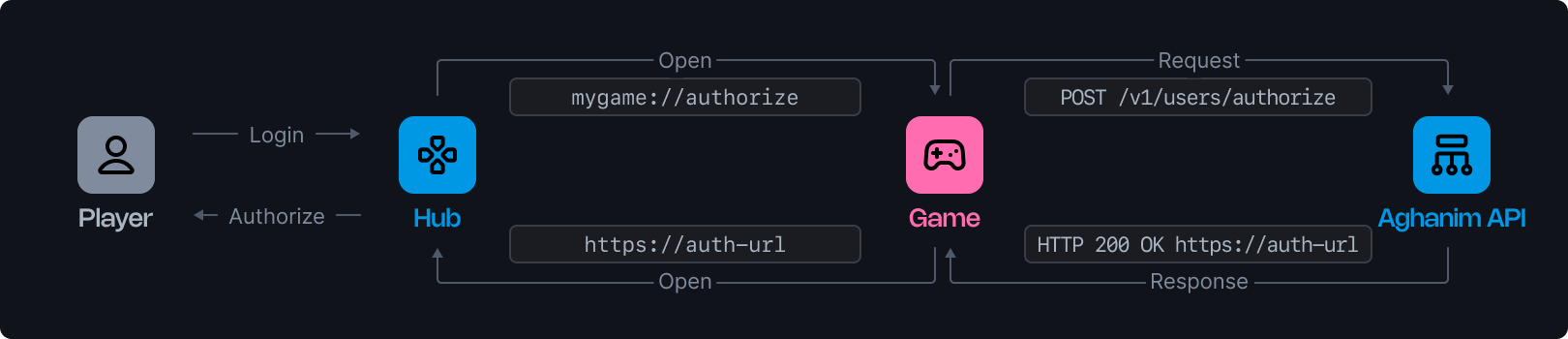
When the player clicks the login button, the Game Hub will redirect them to the game deep link. The URL will resemble the following format:
mygame://authorize-player?nonce={nonce}
Here, {nonce} is a unique string generated by the Game Hub for each authorization request.
The Game Client must intercept the deep link and extract the nonce parameter from the URL. This nonce will be used in the authorization request to the Game Backend.
Step 2: Forward the Authorization Request to the Game Backend
After the player initiates an authorized session, the Game Client should send an authorization request to the Game Backend.
Step 3: Send the Authorization Request to Aghanim
Upon receiving the request from the Game Client, the Game Backend must send a POST request to the Aghanim API using the endpoint Authorize User. Include the following parameters in the request:
| Parameter | Description | Required? |
|---|---|---|
player_id | The unique identifier for the player to be authorized. | Yes |
nonce | The unique string provided by the game hub. | Yes |
redirect_path | The game hub page to redirect the player to. | No |
Example Request
curl --request POST \
  --url https://api.aghanim.com/s2s/v1/users/authorize \
  --header 'Authorization: Bearer YOUR_S2S_API_KEY' \
  --header 'Content-Type: application/json' \
  --data '{
    "player_id": "2D2R-OP3C",
    "nonce": "N2Q3Y2MGI6bQ"
  }'
Example Response
{
  "authorization_url": "https://your-game-hub/go/login?token=dXNyX...FTV0xqTWg&nonce=N2Q3Y2MGI6bQ"
}
Step 4: Redirect the Player to the Authorization URL
Once the Game Backend receives the authorization_url from Aghanim, it should pass this URL back to the Game Client. The Game Client should then launch the default browser and open the authorization URL. This action completes the player’s authorization on the Game Hub.
Need help?
Contact our integration team at integration@aghanim.com