In-Game Popups
In-game popups are a direct communication channel between game developers and players, designed to deliver information, promotions, and incentives in a timely manner. By utilizing Aghanim LiveOps Builder, developers can trigger these popups based on player actions within the game or interactions on your game hub, aligning with strategic criteria to enhance engagement and improve the gaming experience.
Requirements
For integrating in-game popups with Aghanim, ensure your game meets these requirements:
- A developed frontend for the in-game popup that matches your game's aesthetic for a seamless user experience.
- A publicly accessible HTTPS endpoint to receive Aghanim popup webhooks and trigger the display of popups within your game.
- For campaigns triggered by in-game events, define the in-game conditions that will launch the campaign, and implement the necessary logic to execute an Aghanim API call to start the campaign.
General flow for running an in-game popup
To implement an in-game popup, follow these steps:
- In the Aghanim Dashboard under Game → Webhooks, register the webhook URL designed to process Aghanim popup webhooks. Ensure you select In Game Popup as the event type.
- Create a campaign on the Aghanim Dashboard, detailing when and why an in-game popup should appear to players.
- Publish the campaign in the Settings section of the campaign's editing mode.
- For campaigns initiated by in-game events, trigger the campaign via the Aghanim API by setting up the necessary API call and trigger logic in your game.
- Once campaign conditions are met, Aghanim sends a webhook to display the popup in the following format:
curl -X "https://your-webhook-endpoint.com/your/webhook/uri" \
  -H "Host: your-webhook-endpoint.com" \
  -H "x-aghanim-signature-timestamp: <EVENT_TIMESTAMP>" \
  -H "x-aghanim-signature: <HMAC-SHA256_SIGNATURE>" \
  -H 'user-agent: Aghanim/0.1.0' \
  -H 'content-type: application/json' \
  -H 'accept-encoding: gzip, deflate' \
  -H 'accept: */*' \
  -d '{
        "event_id": "<EVENT_ID>",
        "event_time": 1709974737,
        "event_type": "ingame.popup",
        "idempotency_key": null,
        "event_data": {
          "player_id": "<PLAYER_ID>",
          "title": "<IN_GAME_POPUP_TITLE>",
          "body": "<IN_GAME_POPUP_BODY>",
          "icon": null,
          "url": null
        }
      }'
Use case: Re-engaging players with game hub news via in-game popups
This campaign targets players who have not visited the game hub in over 12 hours, aiming to draw them back by highlighting the latest news:
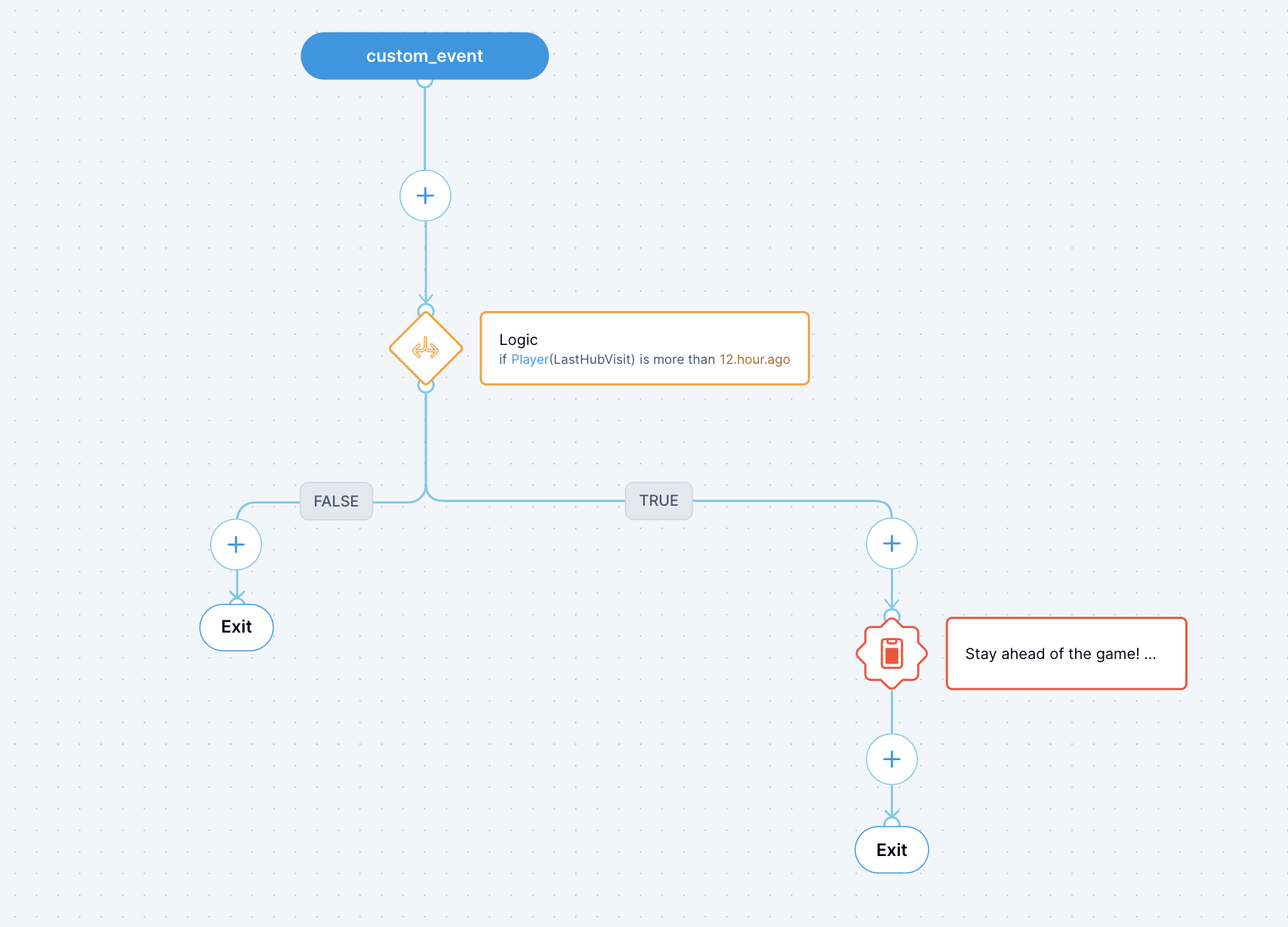
The campaign initiates with a Custom Event, necessitating the implementation of trigger logic on your side. For example, consider player login as the trigger for this campaign. Upon login, your game makes an API call to Aghanim to start the campaign. Aghanim then checks if the player has engaged with the game hub in the last 12 hours. If the absence exceeds 12 hours, Aghanim dispatches a webhook containing the popup's details. Your game's endpoint then processes this information, displaying the popup and effectively drawing the player back to the game hub activities.
To implement the campaign:
-
Develop the frontend for the campaign's popup.
-
Create a deep link directing players to the game hub's news page and incorporate it into the popup.
-
Define the in-game conditions that trigger the popup, such as player login, and implement the corresponding logic in your game.
-
Following player login, call the Aghanim API to initiate the campaign for the player, e.g.:
curl -u sk_xxxxxxxxxxxx: -X POST https://api.aghanim.com/s2s/v1/events \
  -H "Content-Type: application/json" \
  -d '{ \
      "event_time":1711366555685, \
      "event_type":"My Campaign", \
      "event_data":{ \
          "player_id":"testplayer" \
      } \
}' -
Upon receiving your webhook, Aghanim checks if the specified player has visited the game hub in the last 12 hours.
-
If the player's last visit exceeds 12 hours, Aghanim dispatches a webhook with the popup content, e.g.:
curl -X "https://your-webhook-endpoint.com/your/webhook/uri" \
  -H "Host: your-webhook-endpoint.com" \
  -H "x-aghanim-signature-timestamp: <EVENT_TIMESTAMP>" \
  -H "x-aghanim-signature: <HMAC-SHA256_SIGNATURE>" \
  -H 'user-agent: Aghanim/0.1.0' \
  -H 'content-type: application/json' \
  -H 'accept-encoding: gzip, deflate' \
  -H 'accept: */*' \
  -d '{
        "event_id": "cam_ezSOgmVybuV",
        "event_time": 1709974737,
        "event_type": "ingame.popup",
        "idempotency_key": null,
        "event_data": {
          "player_id": "testplayer",
          "title": "Stay ahead of the game! 🌟",
          "body": "Dive into the latest game updates and insights that will keep you on the edge of your seat. Explore now and be part of the unfolding adventure that is captivating gamers worldwide!",
          "icon": null,
          "url": null
        }
}' -
Process the received webhook on your game side and display the popup with the provided content.
Need help?
Contact our integration team at integration@aghanim.com