Getting Started
This guide provides step-by-step instructions for integrating your mobile game with Aghanim. The only requirements for this integration are to have your game available on the app store and allocate some developer resources towards the integration.
With a single integration, you will connect with the entire suite of Aghanim products, enabling you to deploy your game hub, start liveops campaigns, accept payments worldwide, and much more.
Step 1: Register with Aghanim and link your game
Your game must be available on the Apple App Store or Google Play Store.
Register with Aghanim and link your mobile game →
Step 2: Handle Aghanim's events
Aghanim sends multiple events to your backend during player interactions in the game hub. Your system should respond to these events with actions like verifying players against your database and updating player accounts with purchased items.
Essential Aghanim events for a successful integration include:
- Verify player (
player.verify): Notifies your game of player logins, requiring your webhook server's confirmation to allow or deny game hub access. - Item add (
item.add): Notifies your game to credit items to a player's account based on their activities within the game hub. - Item remove (
item.remove): Notifies your game to remove items from a player's account in cases such as payment cancellation or refund.
- player.verify
- item.add
- item.remove
{
  "event_type": "player.verify",
  "event_data": {"player_id": "2D2R-OP3C"},
  "event_id": "whevt_eCacGbJVbvToOgzjXUgOCitkQE",
  "event_time": 1725548450,
  "idempotency_key": null,
  "sandbox": false,
  "trigger": "hub.login",
  "request_id": "d1593e9c-c291-4004-8846-6679c2e5810b",
  "transaction_id": "whtx_eCacGbJVbvToOgzjXUgOCitkQE"
}
{
  "event_type": "item.add",
  "event_data": {
    "player_id": "2D2R-OP3C",
    "items": [
      {
        "id": "itm_exTBZQmIlDz",
        "name": "Crystals",
        "description": "Reign supreme over your rivals with this massive crystal treasure.",
        "sku": "crystals",
        "quantity": 480000,
        "price": 9499,
        "price_decimal": 94.99,
        "currency": "USD",
        "type": "item",
        "nested_items": null
      }
    ],
    "reason": "Redeemed coupon WELCOME"
  },
  "event_time": 1725548450,
  "event_id": "whevt_eCacGbJVbvToOgzjXUgOCitkQE",
  "idempotency_key": "550e8400-e29b-41d4-a716-446655440000",
  "sandbox": false,
  "trigger": "order.paid",
  "request_id": "d1593e9c-c291-4004-8846-6679c2e5810b",
  "transaction_id": "whtx_eCacGbJVbvToOgzjXUgOCitkQE"
}
{
  "event_type": "item.remove",
  "event_data": {
    "player_id": "2D2R-OP3C",
    "items": [
      {
        "id": "itm_exTBZQmIlDz",
        "name": "Crystals",
        "description": "Reign supreme over your rivals with this massive crystal treasure.",
        "sku": "crystals",
        "quantity": 480000,
        "price": 9499,
        "price_decimal": 94.99,
        "currency": "USD",
        "type": "item",
        "nested_items": null
      }
    ],
    "reason": "Redeemed coupon WELCOME"
  },
  "event_time": 1725548450,
  "event_id": "whevt_eCacGbJVbvToOgzjXUgOCitkQE",
  "idempotency_key": "550e8400-e29b-41d4-a716-446655440000",
  "sandbox": false,
  "trigger": "order.refunded",
  "request_id": "d1593e9c-c291-4004-8846-6679c2e5810b",
  "transaction_id": "whtx_eCacGbJVbvToOgzjXUgOCitkQE"
}
Develop a webhook endpoint function
To manage events from Aghanim, you need to develop one or more functions. This choice depends on whether you prefer to process all events through a single endpoint or use multiple endpoints, with each dedicated to specific events or different logic.
Your function(s) should adhere to the following requirements and logic:
- HTTPS endpoint, accepting POST webhook requests.
- Listen for events, generated and signed by Aghanim.
- Handle the
idempotency_keyincluded in the webhook payload to prevent processing duplicate webhooks. - Appropriately process incoming requests, such as verifying players against your database to determine access to the game hub based on Player ID, crediting purchased items to the player's account, removing refunded items from the player's account, etc.
- Respond with 2xx status codes for successfully processed events, and 4xx or 5xx for denial or errors. As for the
player.verifyevent, your server is also expected to return the JSON payload containing player data in case of successful player verification.
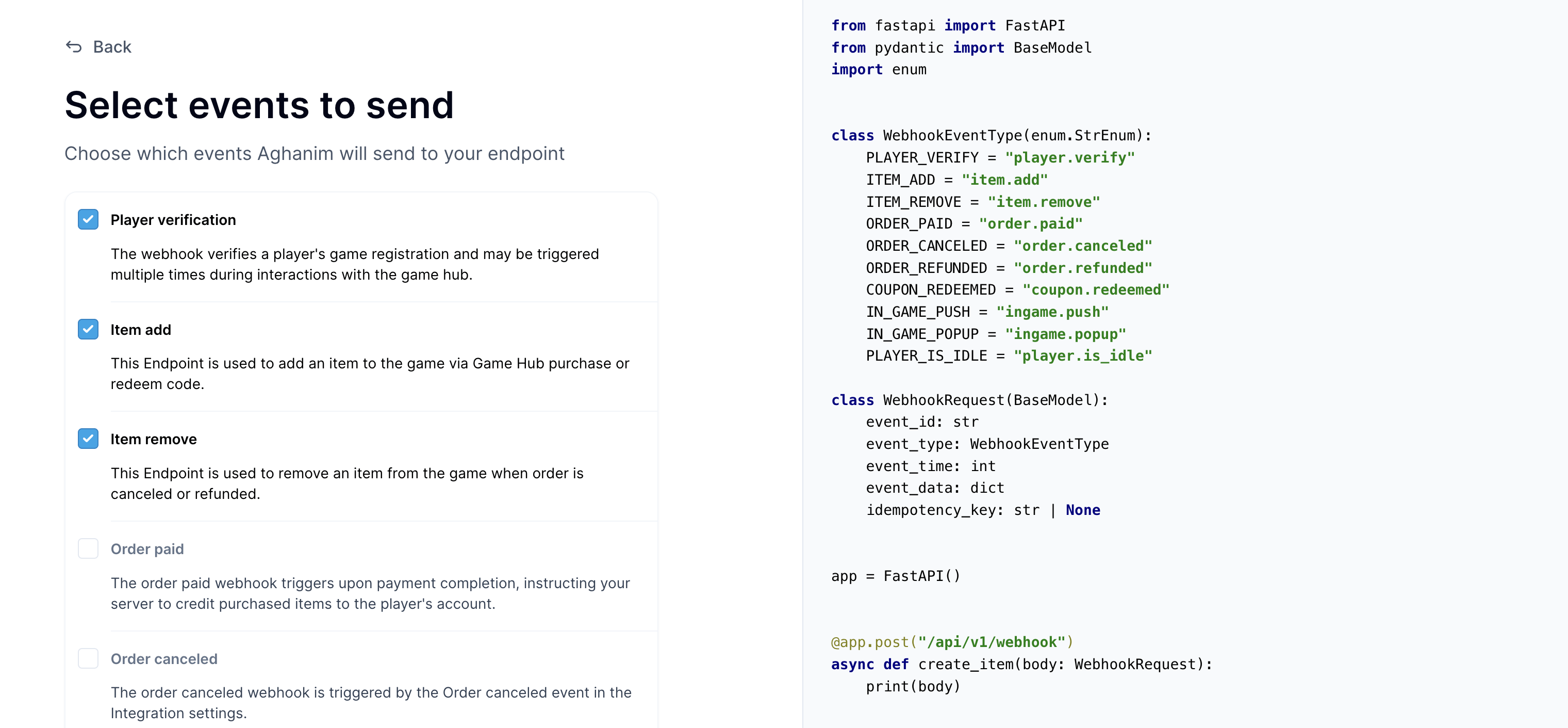
Below are function templates designed for a single endpoint that processes essential events generated by Aghanim:
You can test your webhook endpoint function locally by executing the following request:
- cURL
- Python
curl -X POST "https://your-webhook-endpoint.com/your/webhook/uri" \
  -H 'x-aghanim-signature-timestamp: <EVENT_TIMESTAMP>' \
  -H 'x-aghanim-signature: <HMAC-SHA256_SIGNATURE>' \
  -H 'user-agent: Aghanim/0.1.0' \
  -H 'content-type: application/json' \
  -H 'accept: */*' \
  -H 'host: your-webhook-endpoint.com' \
  -d '{
      "event_id": "whevt_eAeXhOxLwxy",
      "event_type": "player.verify",
      "idempotency_key": null,
      "event_data": {
          "player_id": "testplayer"
      }
  }'
import requests

# Endpoint URL
url = "https://your-webhook-endpoint.com/your/webhook/uri"

# Headers
headers = {
    'x-aghanim-signature-timestamp': '<EVENT_TIMESTAMP>',
    'x-aghanim-signature': '<HMAC-SHA256_SIGNATURE>',
    'user-agent': 'Aghanim/0.1.0',
    'content-type': 'application/json',
    'accept': '*/*',
    'host': 'your-webhook-endpoint.com'
}

# JSON payload
data = {
    "event_id": "whevt_eAeXhOxLwxy",
    "event_type": "player.verify",
    "idempotency_key": null,
    "event_data": {
        "player_id": "testplayer"
    }
}

# Make the POST request
response = requests.post(url, headers=headers, json=data)

# Print the response from the server
print(response.text)
Register your endpoint within Aghanim
-
Make your endpoint(s) available.
-
Register your endpoint(s) within Aghanim account → Game → Webhooks → New Webhook by choosing the following events:
- Player verification
- Item add
- Item remove
-
Copy a generated secret key and specify it in your webhook function for request signature validation.
Step 3: Set up Player ID authentication
Players can log into the game hub using their Player IDs, which should be a unique identifier utilized within the game.
- Determine which in-game parameter will be utilized for authenticating players in the game hub. This should be a unique identifier already in use in your game.
- Aghanim sends notifications to your server following player interactions with the game hub, including login attempts. Your server must then either allow or deny access based on the Player ID. Implement this verification process as outlined below.
- Instruct game hub users on locating their authentication data by adding detailed instructions in the Aghanim Dashboard under Game → Settings → Game Hub Login look & feel. Detail where players can find their Player ID in the game, and consider including an example image for clarity.
Step 4: Review the generated game hub
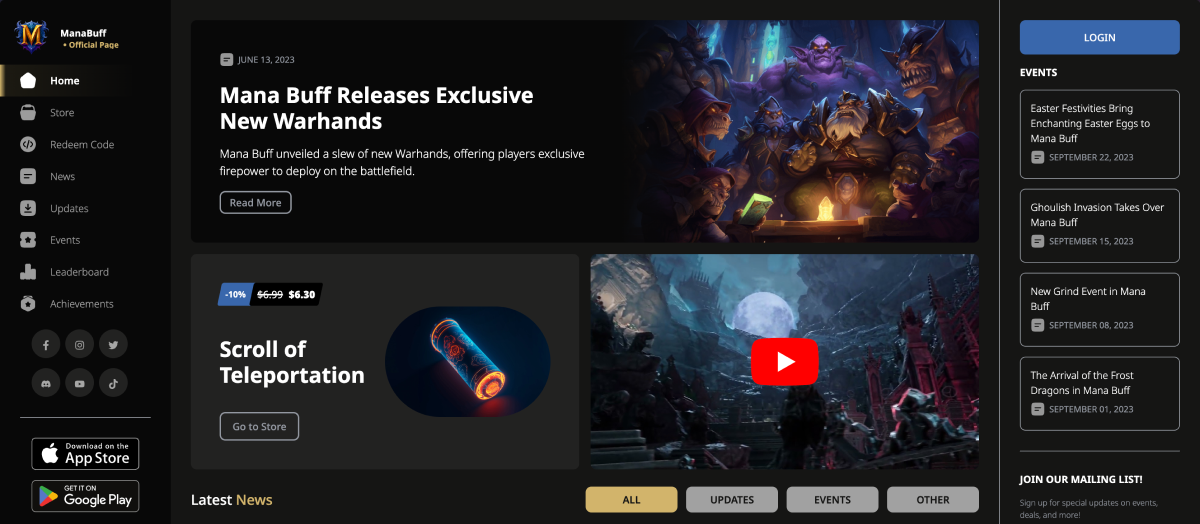
After linking your mobile game, Aghanim instantly creates a game hub tailored to your game's data. This hub acts as a direct-to-consumer website featuring a game store, news, events, leaderboards, achievements, daily rewards, special offers, and redeemable codes, all ready to use with options for full customization and branding.
To assemble the game hub, we source all necessary data directly from the app store, which automatically populates the game hub with:
- Your game's logo
- In-game items along with their prices
- News and updates
- Upcoming and ongoing events
- Leaderboards
For any information the app store lacks, Aghanim supplements it through an AI-guided Hub setup process, adding missing elements such as item images, news images, and more.
To access your game hub, navigate to Game Hub Builder → View your Game Hub on the Aghanim Dashboard.
Step 5: Run a campaign for mobile player engagement
Your game hub is now ready! It is time to draw your mobile players into the web experience, engaging them through liveops campaigns.
Select at least one of the following campaigns to proceed:
- Linking out players to your game hub news
- Influencer-driven game hub engagement
- Email redeem codes to boost game hub adoption
- Link out players to get free items
Need help?
Contact our integration team at integration@aghanim.com