Player Verify Webhook
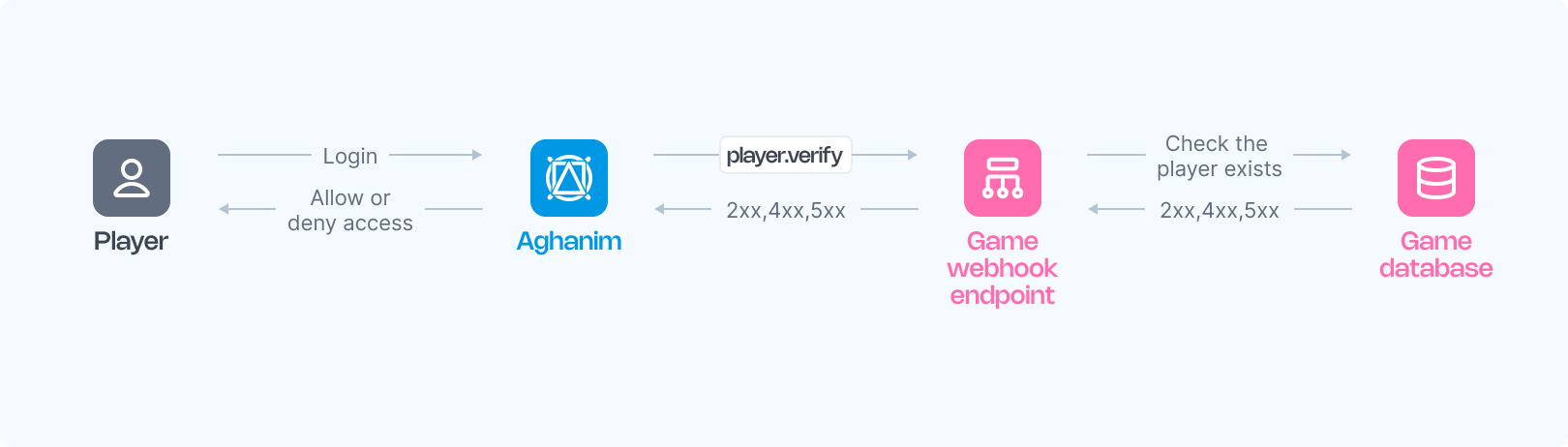
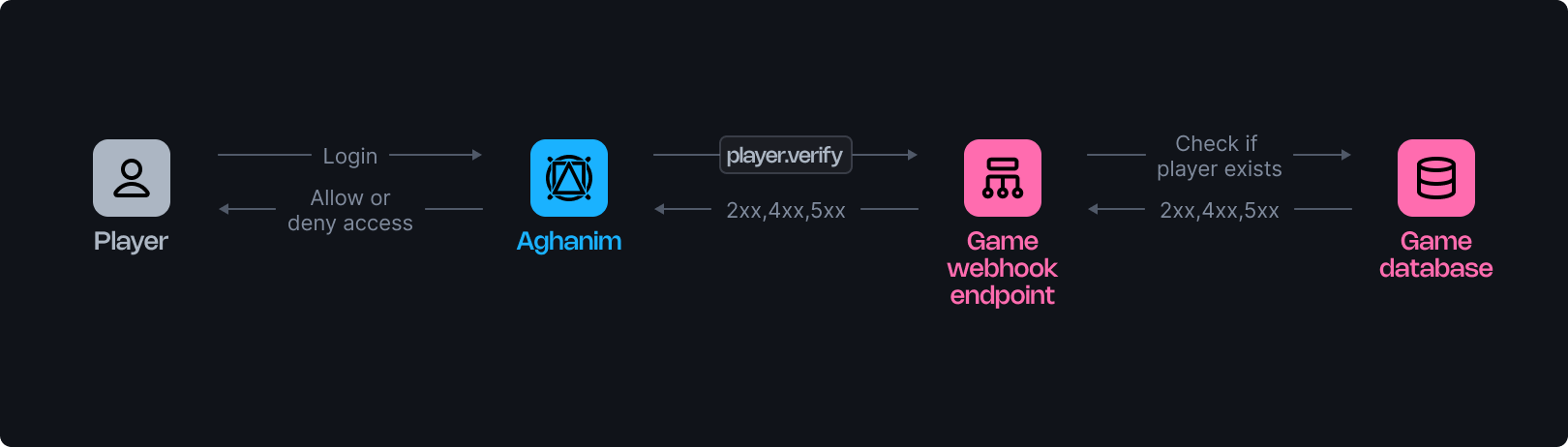
Aghanim utilizes a player verification webhook to inform your game about player logins, requiring confirmation from your webhook server to permit or deny access to the game hub. This document details the operation of these webhooks.
The webhook verifies a player's registration in your game and may be invoked multiple times during the player interactions with the game hub.
Requirements
To use player verification webhooks from Aghanim, you should have the webhook server configured as follows:
- HTTPS endpoint, accepting POST webhook requests.
- Listen for events, generated and signed by Aghanim.
- Verify players against your database to determine access to the game hub based on Player ID.
- Respond with a 2xx status code and the corresponding JSON payload for approval, and 4xx or 5xx for denial or errors.
Configuration
Below are function templates designed for an endpoint that processes player verification events generated by Aghanim:
Once your function is ready:
- Make your endpoint available.
- Register your endpoint within Aghanim account → Game → Webhooks → New Webhook by choosing the player verification event type.
Alternatively, you can register your endpoint within Aghanim using the Create Webhook API method.
The Event Data schema
| Key | Type | Description |
|---|---|---|
player_id | string | The unique Player ID chosen for player authentication. |
Response schema
Upon a successful player verification, your server is expected to return a status code in the 2xx range and the following JSON payload containing player data:
| Key | Type | Description | Required? |
|---|---|---|---|
player_id | string | Unique Player ID chosen for player authentication. | Yes |
name | string | Player's nickname. | Yes |
attributes | Attributes | Basic player attributes expected by Aghanim. | Yes |
avatar_url | string | Player's avatar URL. | No |
email | string | Player's email address. | No |
banned | boolean | Indicates whether the player is banned in the game. | No |
segments | string[] | Segments to which the player belongs. | No |
country | string | Two-letter country code according to ISO 3166‑1. | No |
custom_attributes | CustomAttributes | Custom player attributes. | No |
balances | Balance[] | Player's virtual currency balances. | No |
The Balance object
The balance object contains the following fields:
| Key | Type | Description | Required? |
|---|---|---|---|
sku | string | Item SKU matching on both the game and Aghanim sides linked to the virtual currency. | Yes |
quantity | number | Player's balance in the currency. | Yes |
The Attribute object
The attribute object contains the following fields:
| Key | Type | Description | Required? |
|---|---|---|---|
level | number | Player's level in the game. | Yes |
platform | string | The platform on which the player is using the game hub. Possible values: ios, android. | No |
marketplace | string | Marketplace from which the player originates. Possible values: app_store, google_play, other. | No |
soft_currency_amount | number | Player's soft currency balance. | No |
hard_currency_amount | number | Player's hard currency balance. | No |
The Custom Attributes object
The custom_attributes object contains key-value pairs, for example:
{
  "is_premium": true,
  "age": 25,
  "favorite_color": "blue",
  "install_date": "2024-01-01"
}
These attributes can be used later in LiveOps or Segmentation for constructing logic conditions to target specific player segments.
Important: custom attributes must be declared in Game → Player attributes.
Successful response example:
{
  "player_id": "2D2R-OP3C",
  "name": "Beebee-Ate",
  "avatar_url": "https://static-platform.aghanim.com/images/bb8.jpg",
  "attributes": {"level": 2},
  "country": "US"
}
Need help?
Contact our integration team at integration@aghanim.com